Get the rig ready.
Import at home, plug into the rig you will use on the night, run Soundcheck, then leave the settings alone.
Email [email protected]If something goes wrong, email us with the iPad model, the iPadOS version, the interface or cable you were using, and what you were doing at the time. A screenshot of Soundcheck helps.
Five-minute setup
- Import. Put numbered tracks in a folder and import the folder.
- Route. Set click to your monitor output and track to the desk.
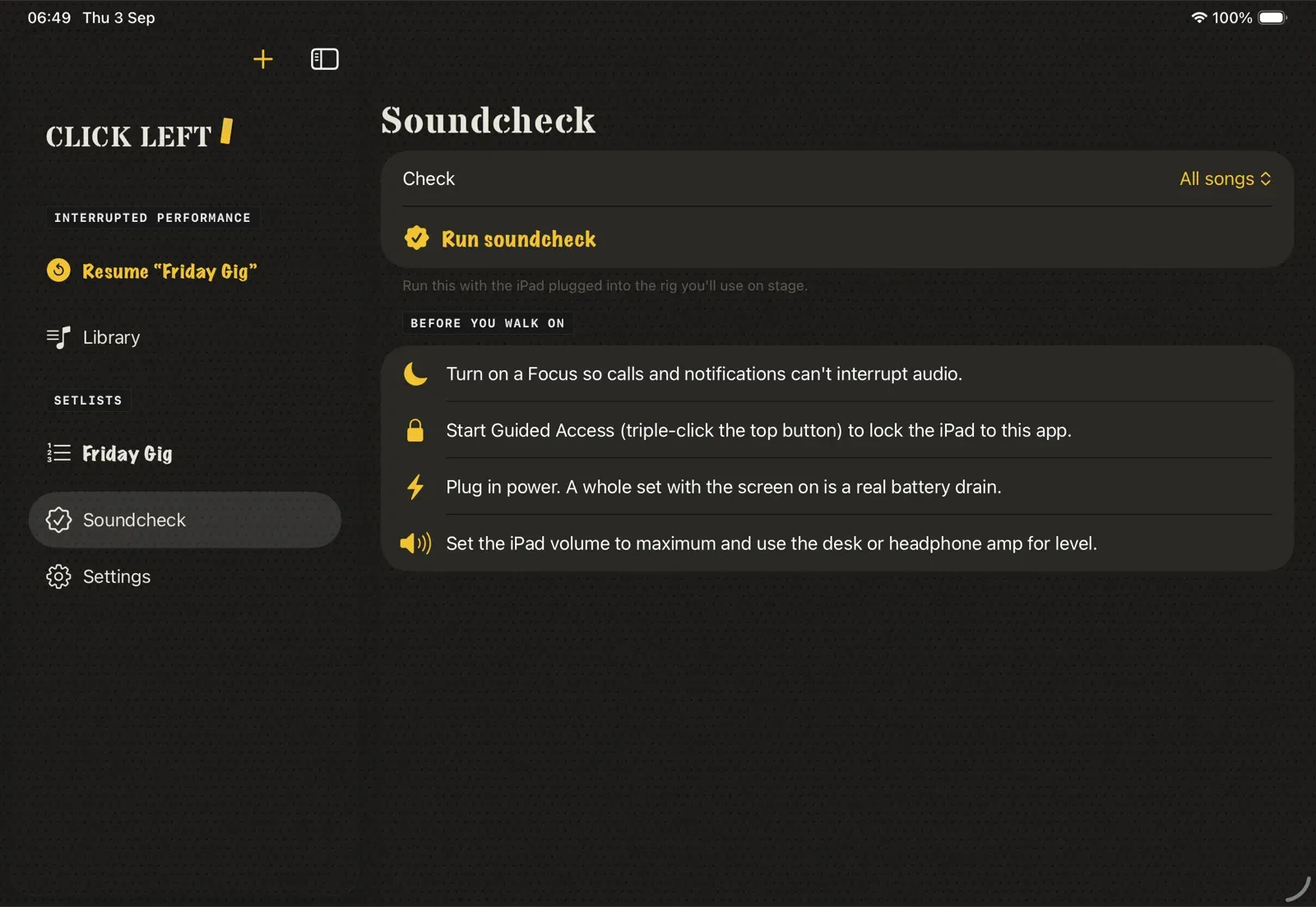
- Check. Run Soundcheck with the real cable or interface attached.
- Prepare. Plug in power, turn on Focus, then enable Guided Access.
- Play. Open the setlist, tap Perform, and hit a pad.
FAQ
What's new lists each release, newest first.
What should be in my audio file?
Use a stereo file with the click on one channel and the backing mix on the other. Click Left can suggest which side is the click, and you can correct it per song.
What file types can I import?
WAV, AIFF, M4A and MP3. You can import through Files, AirDrop, Finder file sharing, a USB drive, or file providers such as Dropbox and Google Drive.
How do I send click and track to different places?
With a two-output headphone socket or interface, route click to output 1 and track to output 2. A stereo Y-cable can then send click to your ears and track to the desk. Multi-output interfaces can use any available channels.
Does it need Wi-Fi or mobile data?
Not for a gig. Tracks and setlists live on the iPad, and the stage screen does not use the network. The one optional exception is Look up song, when you add a click track: that uses Apple Music if you tap it. Any cover art it brings back is stored on the iPad, so the stage never needs a signal.
Can I add a song that only needs a click?
Yes. Add a Metronome song, with no audio file. Set or tap the tempo, choose the time signature, and it sits in the set beside your backing tracks. While it plays you can nudge the tempo by 1 BPM, and the change lands on the same bar and beat. Time signature, subdivision, sound and count-in still need a stop. When you add it you can tap Look up song for a title, artist and tempo from Apple Music. That stays off until you ask.
What does Look up song do?
When you add a click track, Look up song can search Apple Music for a title, artist and tempo, and analyse a short preview on the iPad for BPM. It can also bring back cover art, which is stored on the iPad. It uses MusicKit. It stays off until you tap it. The stage screen still does not use the network.
Can I open Metronome without a setlist?
Yes. Open Metronome from the sidebar, from Open metronome on an empty library, or from the library menu. It is a full-screen metronome. It does not add a row to the library. There is a short guide for using it as just a metronome.
Does the standalone Metronome use a free song slot?
No. Opening Metronome on its own does not count toward the six-song limit and does not create a library song. Adding a Metronome song to a setlist still counts as a song, the same as a track.
How does a Metronome song play on stage?
Hit the pad like any other song, or open standalone Metronome. You get a bar and beat count instead of a waveform, and the click comes through the same output at the same level as your file clicks. The beat lamps sit in their own well. Compound time groups in threes, and silent beats are empty sockets. While the click runs, a scan line crosses the lamps. That motion respects Reduce Motion and Pulse. It keeps going until you stop it, because the click cannot know when the band has finished. On the pads, a set with any click track keeps the beat lamps in the display panel for the whole set.
What does LOCKED mean on the metronome?
The stage player starts LOCKED. While it is locked you can read the tempo and the beat lamps, but a stick cannot change the click. Play locks it again. Unlock is a two-position slider, so a stick cannot flip it.
How do I open one library song on the stage?
Tap the green play button on its row. A click track asks whether to open in the Metronome view or on the pads. Long-press any song in the library and it opens on the stage alone, armed, and nothing plays until you hit Play. A normal tap still opens the song record.
Can I change the tempo while the click is playing?
Yes, on a click track. While it plays, nudge the tempo by 1 BPM and the change lands on the same bar and beat. Time signature, subdivision, sound and count-in still need a stop. Live tempo is for click tracks only: a backing track plays at the tempo it was recorded.
I play in more than one band. Can I keep them apart?
Yes. File songs and setlists under a band, then pick the band at the top of the sidebar and the library narrows to it. Each band has its own click level and click defaults. Bands are in the free version.
Can one song in a set have its own tempo or note?
Yes. In a setlist, any slot can carry its own note, its own tempo and a gap before auto-advance, with a countdown on the stage. The library song stays as it is.
Can I send the running order to the band?
Yes. Share the running order as text or as a printable PDF.
Can I paste a setlist the band sent me?
Yes. In the setlist editor tap Paste setlist, one song per line, then Preview and Add. There is a short guide for the line format.
Can I use a Bluetooth pedal?
Yes. Page-turner pedals such as AirTurn and PageFlip send the same keyboard commands Click Left uses for play, stop, previous and next. With the pad lock on, Next and Previous cannot end a playing song, from the pedal or the screen. Pedal keys act on key-down only, so a held or bouncing pedal does not skip songs.
What happens if my interface drops out?
If the outputs you chose go missing, click and track fall back to outputs 1 and 2 instead of going silent, and the stage tells you.
My tracks all come in at different levels.
Every track is measured as it comes in and matched to the same loudness, and the click is brought to the same peak, so the desk gets the same level every song. It is on by default; the target and the switch are in Settings. A quiet, dynamic mix is never turned up past clipping, so the library marks any song that cannot quite reach the target.
A song says its audio is missing.
Open the library and point the song at its audio file again. When you import, Click Left also checks for duplicates, so the same file does not land twice.
Can I sort or tidy the library?
Yes. Sort and filter the library, and select several songs at once to deal with them together.
How do I back up my library?
Back up the library to a plain folder. Restoring from that folder does not overwrite anything already on the iPad.
The click is on the wrong side.
Open the song in the library and change its layout. Which output the click and the track go to is one setting for every song, in Settings.
What happens if a call comes in?
Playback stops and the stage screen tells you why. It never carries on by itself in the wrong place. Turn on a Focus before the gig so calls and alerts cannot interrupt; Soundcheck reminds you.
How much does it cost?
The free version holds six songs and one setlist, enough to take it to a rehearsal and a gig. Opening Metronome on its own does not count toward that six. Unlock is £9.99 once, with no subscription. The App Store shows the price in your local currency.
Does it run on iPhone?
No. Click Left is an iPad app; the pad grid needs the room.
What is not included?
The current release does not include lyrics, MIDI, multitrack stems, EQ, plugins, network sessions or cloud sync.